
Having colored text in the command line is a great help for spotting error or success messages. Unfortunately, those of us developing under Windows do not have this feature by default. Here’s how to enable it.
Done. You can now enjoy the colored output of PHPUnit for example.
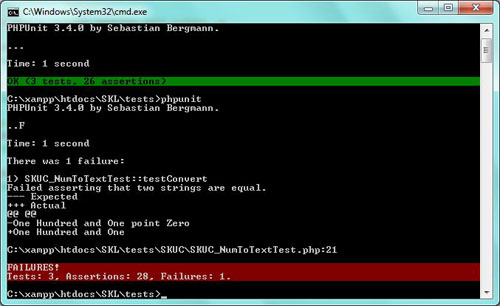
Note: I have installed ANSICON 1.3 under Windows 7 x86 (32 bits). My best guess is that this process will work for other versions of Windows too.
Update: I have installed ANSICON 1.61 under Windows 8 x64 (64 bits) and it works perfectly. The above steps are also updated to work under Windows 8.
Update: I have written a new post on how to Generate Command Line Colors with PHP
Founder of SOFTKUBE, lead developer, and getting things done addict. Passionate about open source, user interface design, business development, and the tech world.
A small team of experts developing simple, usable, and high-quality web solutions. We blog about business, entrepreneurship, web development, and technology.
Custom Theme Migration from Drupal 9 to Drupal 10
How to Change the Most Recent Git Commit Message
How to Make Google Chrome Forget a Permanent HTTP 301 Redirect
Finding and Fixing Unintended Body Overflow to Remove Horizontal Scrollbars
Business Cheat Sheets CLI Design Development Downloads Drupal Email Google Apps HID Keyboards Multilingualism Open Source Philosophy PHP Pointing Devices Productivity Quotes Science Security SEO Technology Thoughts Windows Zend Framework